 LaunchMon
LAUNCHD FIELD NOTES
LaunchAgent vs LaunchDaemon: which one should your job be?
A LaunchAgent runs as a logged-in user and can show UI. A LaunchDaemon starts at boot as root, before anyone logs in, with no GUI. The folder decides which.
Start in Terminal
These examples use a placeholder label. Substitute the exact Label from your own plist, not its filename.
Agents are loaded when a user logs in and run as that user. ~/Library/LaunchAgents holds yours only; /Library/LaunchAgents is installed by an admin and runs for every user who logs in:
ls ~/Library/LaunchAgents
ls /Library/LaunchAgents
Daemons are loaded at boot into the system domain and run as root unless UserName says otherwise. Their plists are owned by root and not group- or world-writable. Apple’s own are in /System/Library/LaunchAgents and /System/Library/LaunchDaemons.
ls -l /Library/LaunchDaemonsAsk launchd which kind a loaded job is, and which domain it is in:
launchctl print "gui/$(id -u)/local.example" | grep -E "type = Launch|domain ="
launchctl print "system/local.example" | grep -E "type = Launch|domain ="
What to check next
Use a LaunchAgent unless the job needs something only a daemon has. An agent runs as you, inside your login session, so it can show a window, a menu bar item or a notification, and it can use your login keychain and your home folder, subject to the same privacy prompts as any app. Put a personal one in ~/Library/LaunchAgents and load it with launchctl bootstrap "gui/$(id -u)", no sudo. Put one in /Library/LaunchAgents when every account on the Mac should get it: the file belongs to root, but each copy runs as the user who logged in. Use a LaunchDaemon when the job must run before anyone logs in, keep running while nobody is logged in, serve every user at once, or needs root, like a network helper or a whole-disk backup. Daemons live in /Library/LaunchDaemons, owned by root and not writable by group or others (typically root:wheel, mode 644), and load with sudo launchctl bootstrap system followed by the plist path. To run a daemon as an ordinary account, set UserName and optionally GroupName. The manual says those keys only apply in the system domain, so an agent cannot use them to become root. A daemon cannot put anything on screen, and ~ in its script means root’s home, /var/root, not yours. Either kind still needs a trigger such as RunAtLoad, KeepAlive, StartInterval or StartCalendarInterval; the folder only decides when it is loaded and as whom. On macOS 13 and later both kinds are listed in System Settings, General, Login Items, under Allow in the Background.
Why it happens
launchd keeps one system domain, created at boot and run by root, and a domain for each user, with a GUI domain for each person logged in at the screen. A LaunchDaemon is a job in the system domain; a LaunchAgent is a job in a user’s domain. The plist format is the same for both. What makes a plist one or the other is the folder it sits in: at boot launchd loads /Library/LaunchDaemons into the system domain, and at each login it loads /Library/LaunchAgents and that user’s ~/Library/LaunchAgents into the new session. That explains the usual surprises. A GUI app placed in LaunchDaemons starts at boot but never appears, because it has no session to draw in. An agent does not run at the login window, or for an SSH session before you have logged in at the screen, because by default it loads only into GUI (Aqua) sessions. And a plist dropped into any of these folders is not loaded until the next boot or login, or until you bootstrap it.
User agents usually run in gui/<your uid>; system daemons run in system. The same label in different domains refers to different service registrations.
See it in LaunchMon
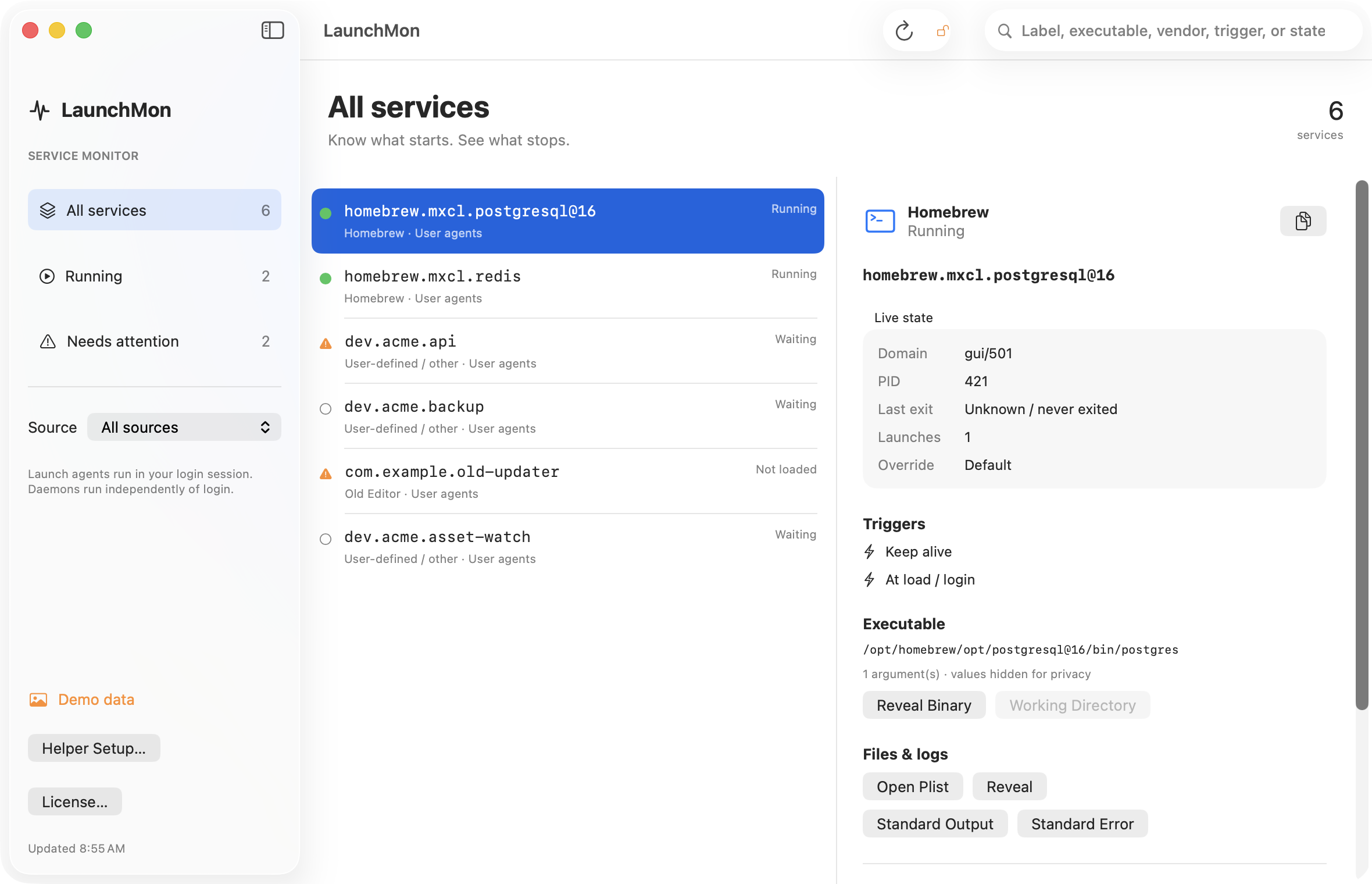
LaunchMon brings the plist, triggers, runtime state, and configured log paths together.
Related guides
- How to run a script at login on a Mac with a LaunchAgent
- What do the status numbers in launchctl list mean? (0, 78, 127, -9, -15)
References: Apple: creating launchd jobs. For commands on your macOS version, run man launchctl and man launchd.plist.