 LaunchMon
LAUNCHD FIELD NOTES
How to read launchctl print output: state, last exit code, runs and the rest
launchctl print gui/$(id -u)/<label> shows what launchd knows about one job. Read state, pid, last exit code, runs, program, arguments and the three environment blocks first; most of the rest is memory and scheduling bookkeeping.
launchctl list gives you one number per job. launchctl print gives you a page: where the job came from, what launchd will run, with which environment, whether it is running now, how often it has run and how it last ended. The manual is blunt that the format is not an API and can change between releases, so read it, but do not parse it in scripts. The field names below are from macOS 26.
Start in Terminal
These examples use a placeholder label. Substitute the exact Label from your own plist, not its filename. The second command keeps only the lines that answer “is it running, and how did it last end?”. Daemons live in the system domain; printing them does not need sudo.
launchctl print "gui/$(id -u)/local.example"
launchctl print "gui/$(id -u)/local.example" | grep -E "^\s(state|pid|runs|last exit code|last terminating signal|program) ="
launchctl print system/com.example.daemon
Here is real output for a small test agent with KeepAlive whose program exits with status 1, trimmed of the memory-accounting blocks and with the label and paths renamed:
gui/501/local.example = {
	active count = 0
	path = /Users/you/Library/LaunchAgents/local.example.plist
	type = LaunchAgent
	state = spawn scheduled

	program = /bin/sh
	arguments = {
		/bin/sh
		-c
		exit 1
	}

	stdout path = /tmp/local.example.out
	stderr path = /tmp/local.example.err
	inherited environment = {
		SSH_AUTH_SOCK => /var/run/com.apple.launchd.abc123/Listeners
	}

	default environment = {
		PATH => /usr/bin:/bin:/usr/sbin:/sbin
	}

	environment = {
		OSLogRateLimit => 64
		XPC_SERVICE_NAME => local.example
	}

	domain = gui/501 [100019]
	minimum runtime = 30
	exit timeout = 5
	runs = 1
	last exit code = 1

	spawn type = daemon (3)

	properties = keepalive | inferred program
}
What to check next
Read these first:
- path is the plist launchd loaded. If you edited a different copy, this is why nothing changed. launchd reads the file only when the job is loaded, so after an edit run bootout and bootstrap. Jobs that apps register at runtime show something like (submitted by runningboardd.609) instead of a file, with type = Submitted.
- type is LaunchAgent for jobs from ~/Library/LaunchAgents or /Library/LaunchAgents, LaunchDaemon for /Library/LaunchDaemons.
- state is running or not running for most jobs. not running is normal for a job that waits for a schedule, a file or a connection. spawn scheduled means launchd intends to start it again, usually a KeepAlive job that exited and is waiting out its throttle interval; if it stays in that cycle, the job is crash-looping. You may briefly see other values, such as xpcproxy while a process is being set up.
- pid appears only while the job is running.
- program and arguments are what launchd executes. If program is a bare name rather than a full path, that is a problem in itself; see the PATH guide below.
- runs counts how many times launchd has started the job since it was loaded. It starts again from zero after a bootout and bootstrap or a restart, so a high number on a job that should run once means it is being restarted.
- last exit code is how the last run ended: 0 is success, other numbers come from the program, and launchd names the ones from sysexits.h, as in 78: EX_CONFIG. (never exited) means it has not ended since it was loaded, either because it is still running or because it has not run yet. If the process was killed by a signal, the line is replaced by last terminating signal, for example Terminated: 15. That is the -15 you see in launchctl list.
- last exit reason appears on many of Apple’s agents with values such as JETSAM_REASON_MEMORY_IDLE_EXIT: the system stopped an idle process to reclaim memory. Those are the jobs that show -9 in launchctl list, and it is not a fault.
The environment comes in three blocks. default environment is what launchd supplies to every job, which in practice is PATH=/usr/bin:/bin:/usr/sbin:/sbin. environment holds the job’s own EnvironmentVariables plus a couple launchd adds itself, XPC_SERVICE_NAME and OSLogRateLimit. inherited environment holds variables set for the whole session, such as SSH_AUTH_SOCK and anything set with launchctl setenv. If a tool works in Terminal and not in the job, compare these with env in your shell.
The rest is configuration you can match to the plist. working directory, stdout path and stderr path are printed only when the plist sets WorkingDirectory, StandardOutPath and StandardErrorPath; if they are missing, the job’s output is going nowhere you can read. minimum runtime is the throttle interval, 10 seconds by default and the ThrottleInterval value if you set one: launchd will not start the job more often than that. exit timeout is how many seconds launchd waits between SIGTERM and SIGKILL when it stops the job. run interval is StartInterval, in seconds. A StartCalendarInterval appears under event triggers as stream com.apple.launchd.calendarinterval, with your Hour and Minute in its descriptor; if the trigger is not listed there, launchd did not get the schedule you meant. A job with Sockets has a sockets block. properties summarises flags: runatload and keepalive match the plist keys, and inferred program means there is no Program key, so launchd took the program from the first item of ProgramArguments.
A few fields only appear while a job is running or has run, among them immediate reason (what caused the launch; values seen include speculative, ipc (mach), ipc (socket), xpc event and launch job demand) and job state. The domain and asid lines, the resource and jetsam coalition blocks, the jetsam and cpumon lines and spawn type are launchd’s scheduling and memory bookkeeping; you can skip them when debugging your own job.
If the label is wrong, print fails with Bad request. followed by Could not find service “local.example” in domain for user gui: 501 (or in domain for system) and exit status 113. Check that you used the Label from inside the plist, that the job is loaded, and that you are looking in the right domain: agents in gui/$(id -u), daemons in system.
Why it happens
launchctl print is the modern counterpart of launchctl list, and it reports launchd’s current view of the job rather than the plist on disk. That difference is the point: the plist says what should happen, print says what launchd actually loaded, which environment it will hand the process, and what happened the last time it ran. Printing the domain instead, launchctl print "gui/$(id -u)", lists every service in your session, and launchctl print-disabled "gui/$(id -u)" lists the jobs that have been disabled or enabled with launchctl disable and enable.
User agents usually run in gui/<your uid>; system daemons run in system. The same label in different domains refers to different service registrations.
See it in LaunchMon
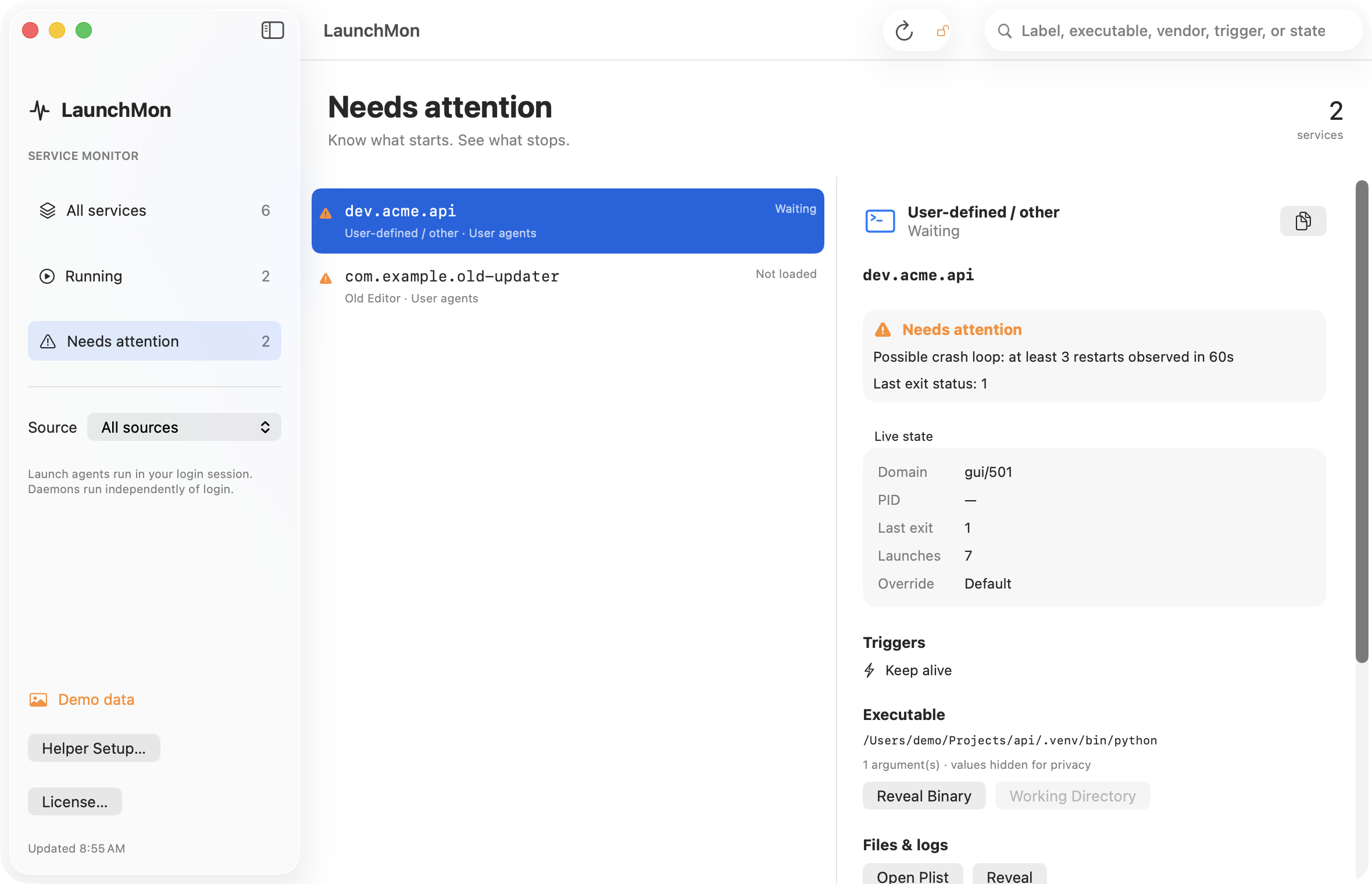
LaunchMon shows the same live state for every agent and daemon (domain, PID, last exit, launch count) next to its triggers, executable and log files, and flags jobs that look like a crash loop, so you do not have to run print on each one.
Related guides
- What do the status numbers in launchctl list mean? (0, 78, 127, -9, -15)
- LaunchAgent says “command not found”: launchd’s PATH and how to fix it
- Why does my launchd job keep restarting?
- How to stop a launch agent on a Mac
References: Apple: creating launchd jobs. For commands on your macOS version, run man launchctl and man launchd.plist.